Onboarding and account
Three pages (about you, your body, your routine and goal) with one field at a time and LGPD consent. Sign-in is with Apple or Google, and returning users get their data back without starting over.
iOS app for anyone with a fitness test ahead
A native iPhone and iPad app that tracks preparation for a physical fitness test, whether the TAF of Brazilian police, military and firefighter exams, a military school or any selection with a minimum standard: it logs weight, tests and workouts, compares them with the official standards, breaks the path into dated goals and shows whether your current pace is enough to pass on exam day.
Features
Built in SwiftUI, with data on the device and a copy in the user's account. Runs on iPhone and iPad, and testers are already using it on TestFlight.
Three pages (about you, your body, your routine and goal) with one field at a time and LGPD consent. Sign-in is with Apple or Google, and returning users get their data back without starting over.
A shortcut to weigh in today with the last value prefilled, down to the scale's two decimals. Average weight, weekly rate, a projection to exam day, weight goals along the way and a charted history. Body measurements and BMI in the profile.
Setup of the exam, its events in the order of the official notice and the required standards by sex and age group. Each event logs every measure the notice asks for, such as reps and time for sit-ups or time and distance for the run, and the notice's limit becomes the standard. Optional target weight for exam day.
The result of each event logged by date. The simulation has its own page and answers "what if the exam were today": it compares each event with its standard, counts the pass/fail events and adds up the points.
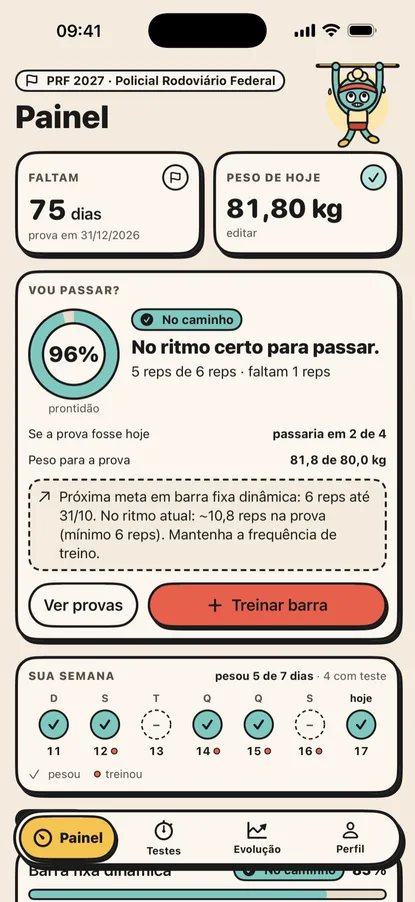
Countdown, overall readiness averaged across events, status per event, a highlight of your weakest event and the next goal to chase.
The path to each event's standard and to the target weight becomes milestones with a value and a date. The app suggests the plan and the user adjusts, removes or adds milestones.
Each event can have support exercises, such as jogging, walking or negative pull-ups, with their own workouts logged on the event page and the dashboard card. Exercises come from a catalog downloaded from the server and stored on the device: a new exercise ships without a new app version.
The backup runs on its own when the app goes to the background. You can restore on another device or delete the account, and no copy is erased without the user choosing.
Monthly, quarterly and annual plans, with a free trial period, billed through the App Store. Without a subscription the app becomes read-only: data stays visible and the user can still erase it or delete the account at any time.
Under the hood
Movent is in beta on TestFlight, with the App Store page's screenshots and copy already prepared. The next phases are planned in the project's specification.