Account and two-step sign-up
Sign in with Apple or Google. Sign-up suggests your name and native language from the device and only asks which language you will study and which language you want translations in, which need not be your native one.
iOS app for learning languages
A native iPhone app that turns any text into study material: paste a text, see every word marked as mastered, learning or unknown, tap the ones you want to learn and get the translation of the word and its sentence right away. What you save becomes a per-language vocabulary with memory levels.
Features
Built in SwiftUI, with data on the device and translation handled by Apple's frameworks, with no server of its own.
Sign in with Apple or Google. Sign-up suggests your name and native language from the device and only asks which language you will study and which language you want translations in, which need not be your native one.
Each study language is a folder with its own words, phrases and texts. The app opens in the current language and you switch whenever you like. Languages are shown by ISO code, with no flags, because a language is not a country.
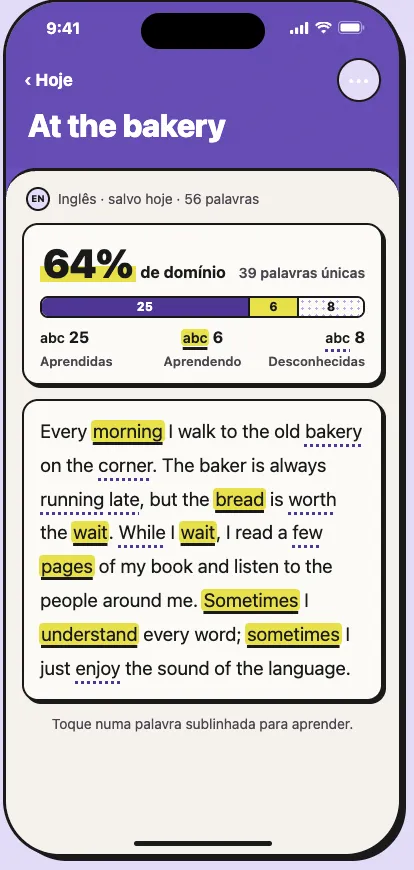
Paste a text and the analysis starts right away. Every word comes out marked by what you already know, and the summary shows your mastery percentage and how many words are unknown. Matching is by base form: "running" counts as "run".
Apple's Translation framework translates the text's words and sentences without leaving the iPhone. Translations live in a per-language dictionary; the suggested one can be corrected, and a corrected one is never overwritten.
Tapping a word opens a single sheet with the base form, the suggested translation and the original sentence with its translation. From there you choose "I want to learn" or "I know this", and can change your mind later.
Words and phrases saved with a translation, a free note and four memory levels: new, learning, reviewing and mastered. Texts stay on the Home screen, each with its mastery.
A mascot of its own in ten poses, drawn in script-generated SVG and also on the app icon. It greets you at login, waves during sign-up and celebrates every mastered word. It never judges a mistake.
Under the hood

Disce is at the beginning and has no test build yet. The review session, the Vocabulary and Progress tabs and spaced repetition are already designed in the project's UX documents.